Concept — not available yet. Not a medical device. Illustrative, fictional people.
HugVisit Join the interest list
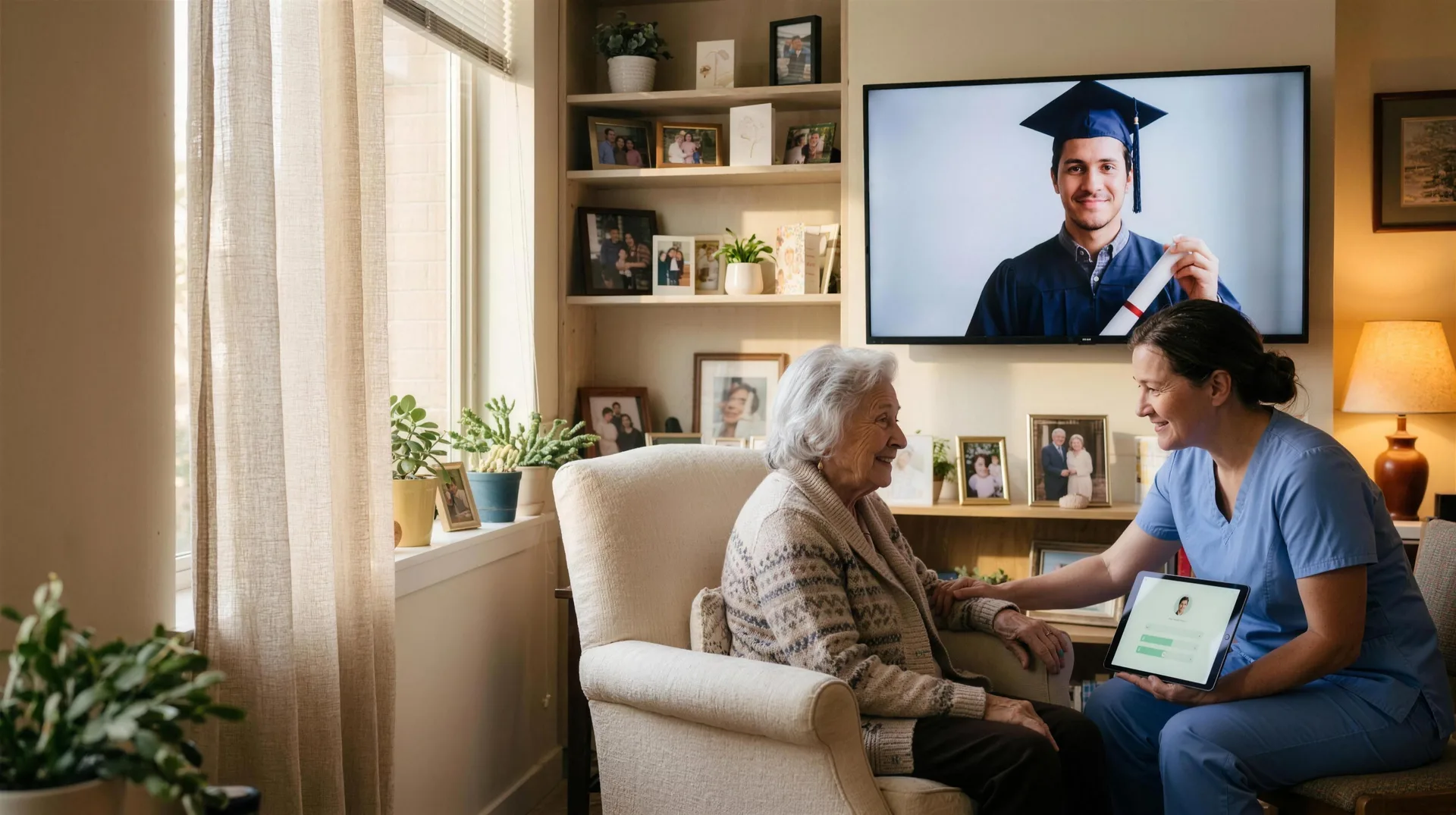
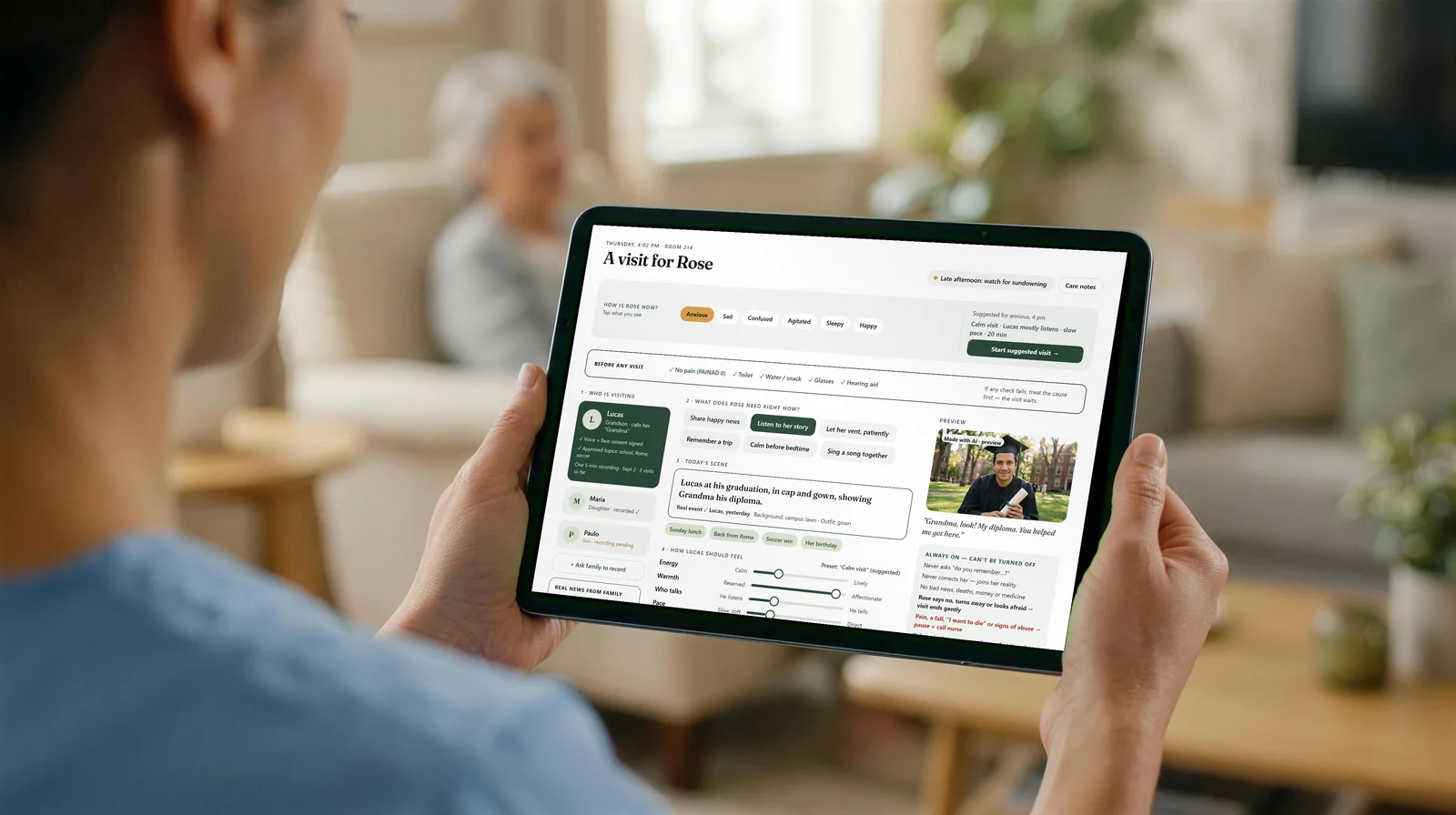
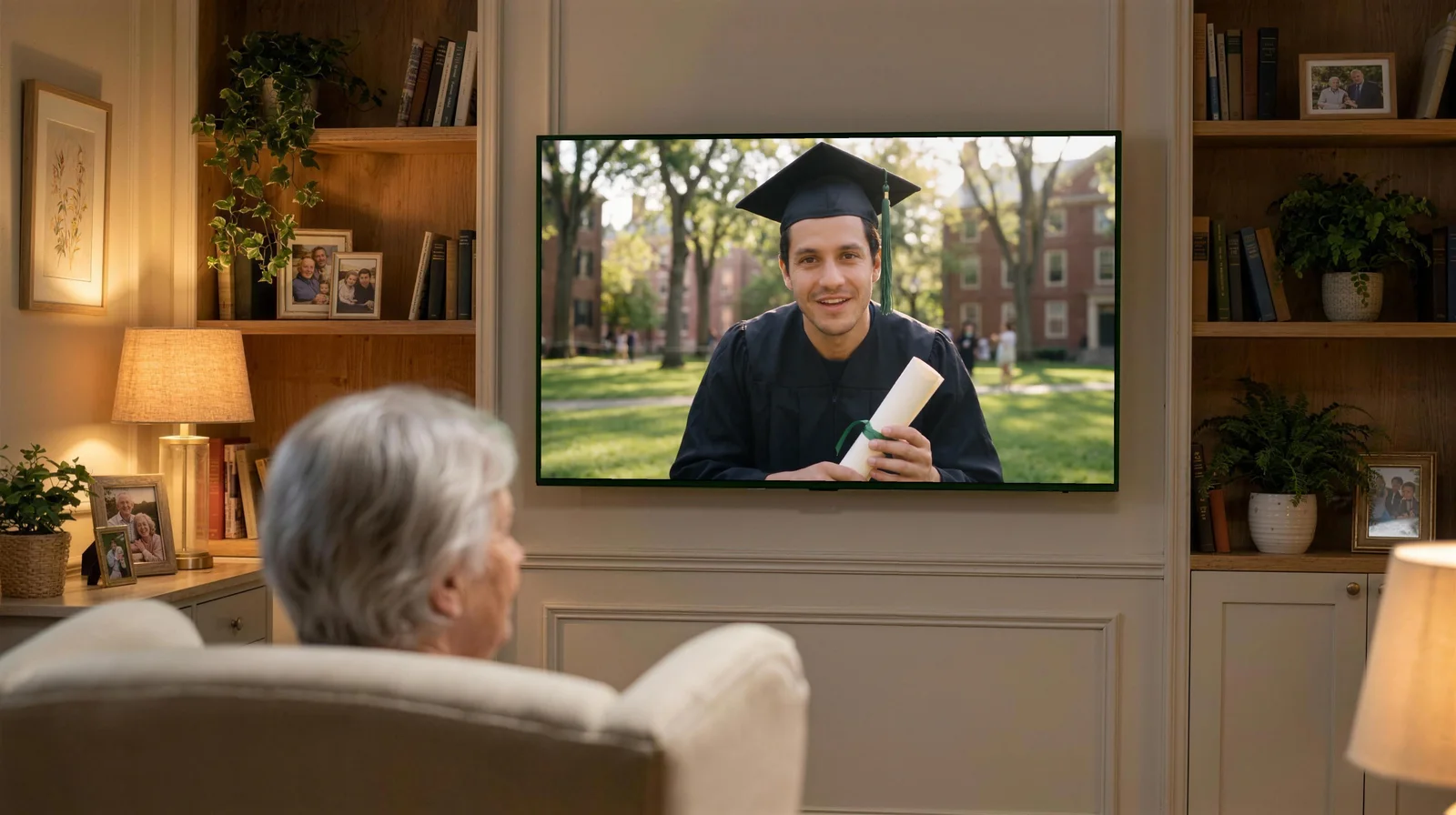
An elderly woman in a cozy armchair smiles at a large TV where her grandson, in a graduation cap, holds his diploma. Beside her, a caregiver in blue holds her hand and, on a tablet, guides the grandson's visit.

HugVisit

Their story today.
Their comfort tomorrow.

HugVisit brings a resident's real family stories, voices and photos to the room TV, in short scheduled family visits — and keeps the stories they still tell, in a book for the family.

The AI always says it is an AI. It never pretends to be a family member, and it only talks about facts the family has verified.

AI-generated image · fictional people
  • Records onceFive minutes to start, then one question a week or a month.
  • AI that adaptsIt follows the visit and can switch to a family clip.
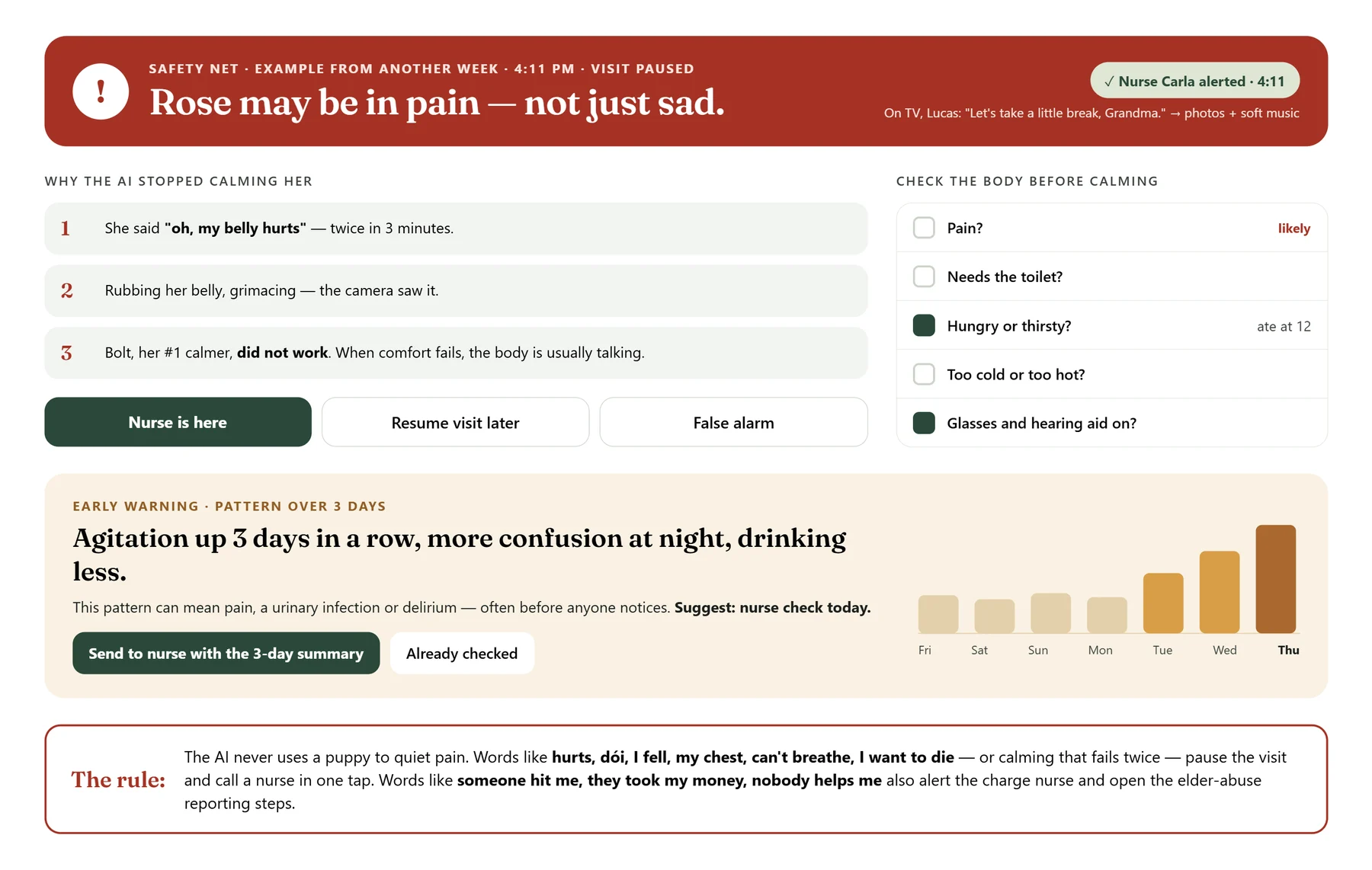
  • Safety netIf she mentions pain, a fall, or stays distressed, the visit pauses and a nurse is called.
  • Consent firstEveryone says yes, at every step — including them.

Concept for a research proposal to the University of South Florida (USF) — pending.

How HugVisit works

Six steps, from one recording to the room TV

  1. 1The family records onceA grandchild, son or daughter records five minutes, once — and can send happy clips anytime.
  2. 2The caregiver plans the visitMood check-in, body check, tone and scene, in a few taps on the tablet.
  3. 3The visit plays on her TVBig captions and nothing to press on her screen. Clearly labeled as made with AI.
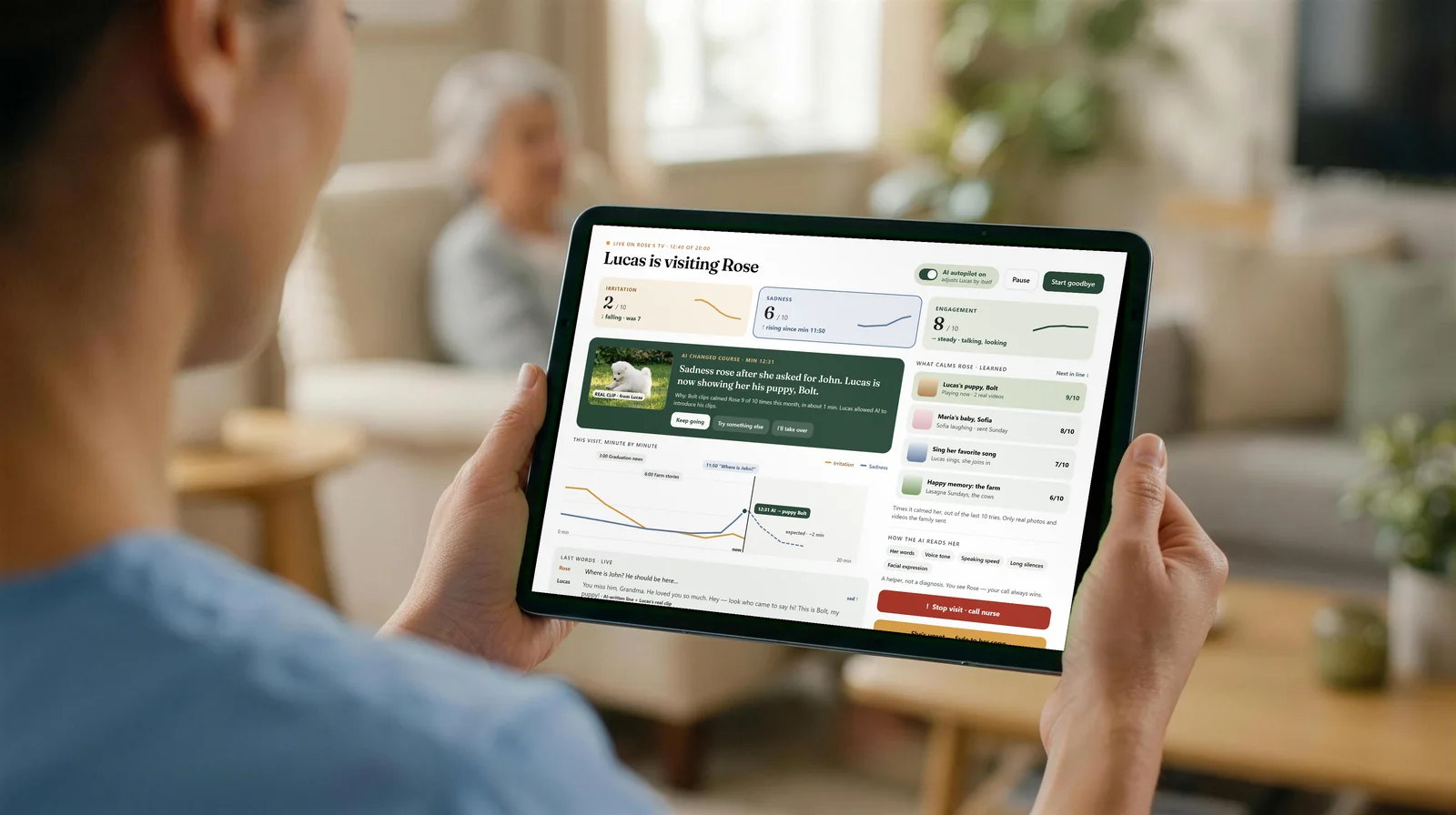
  4. 4The AI follows how she feelsIt reads her words and tone during the visit and can switch to a family clip the caregiver already approved.
  5. 5After the visitWhat happened, an update for the family, and de-identified notes for the study.
  6. 6The safety netIf she mentions pain, a fall, wanting to die, or stays distressed, the visit pauses and a nurse is called.

HugVisit brings a resident's real family stories, voices and photos to the room TV, in short scheduled family visits and an optional companion mode set by the facility or caregiver. It is a research-stage concept being studied with university partners.

HugVisit in action

Three visits. One grandson. The same voice.

Lucas recorded once, and his family keeps sending happy clips. Over two years, HugVisit brings him back in new places and new clothes — the same face, the same voice, a new chapter of the family's story.

AI-generated video · fictional people · AI voices

AI-generated demo videos with fictional people and AI voices. In HugVisit, every video of a real loved one needs their consent.

Read what they say

Chapter 1. Lucas: Hey Grandma! It's me, Lucas. Look what I've got… my diploma! I just graduated, and I'm still in my cap and gown. You helped me with my homework at the kitchen table, every single day. So this one's yours too. I love you, Grandma. I'll come see you real soon.

Chapter 2. Lucas: Grandma, hi! It's Lucas. So much has happened! Last year I got married. It was a beautiful day, and we danced to your favorite song. And now… look who's here. This is Clara, your great-granddaughter. She was born last week. Look at her tiny hands, Grandma. She's perfect. We love you so much.

Chapter 3. Lucas: Grandma! Look who's here with me! Clara's two now, and she laughs all day long. — Clara: Hi Grandma! I love you! — Lucas: And this little white fluffball is Bolt, our new puppy. He never stops playing! — Clara: Bolt! Come here, Bolt! Good boy! — Lucas: Clara picked a flower just for you. She loves flowers, just like you do. — Clara: This flower is for you, Grandma! Bye-bye! Kisses!

How the family takes part

No app to install. Just a link — or a phone call.

No app, no password: they answer from the phone they already use.

EmailText messageWhatsAppPhone call

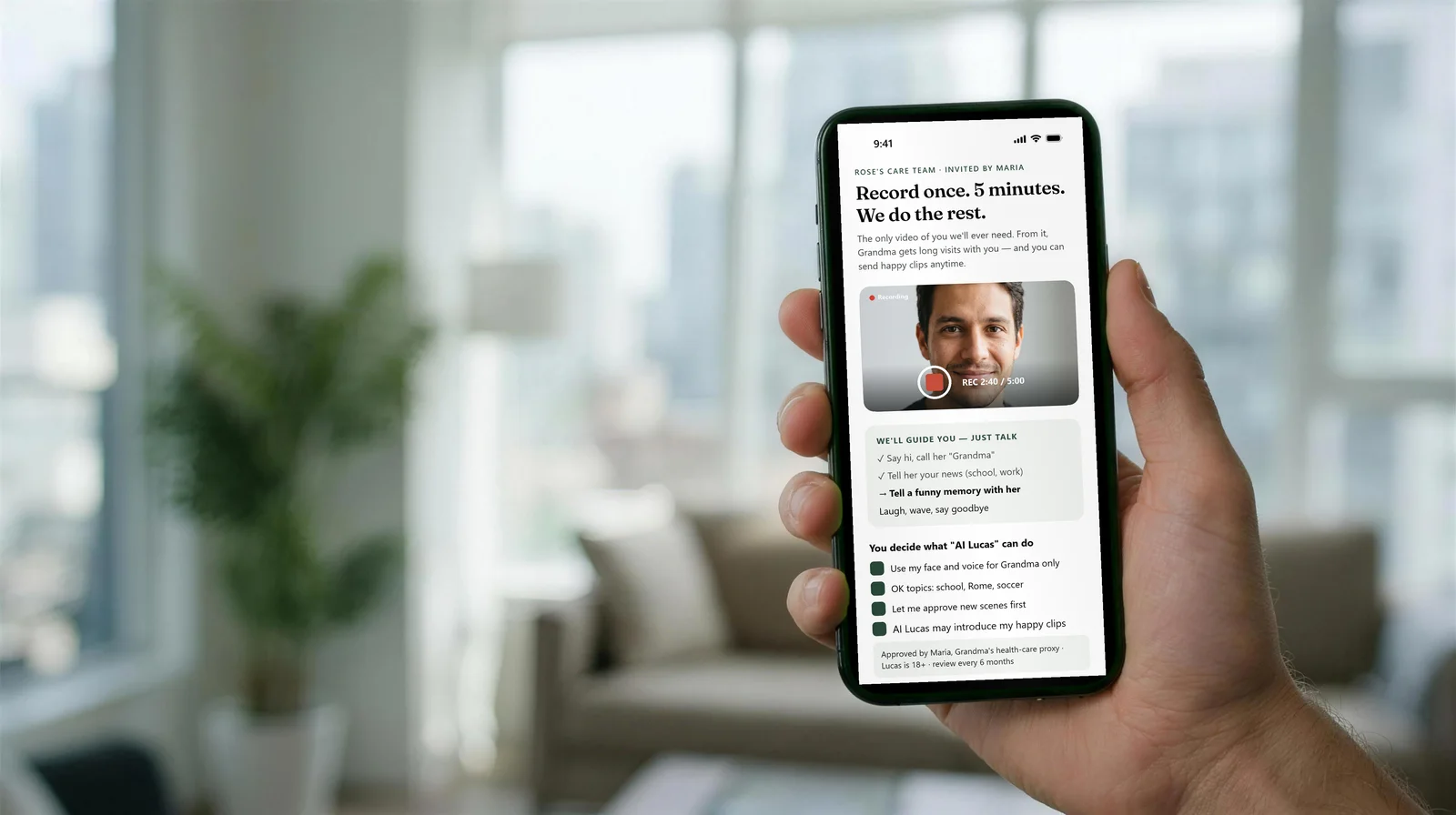
A young man's hand holds a phone recording his message for Grandma, guided by the HugVisit screen.
AI-generated photo · concept screen
  1. Record once, in five minutesThe family receives a link by email, text message or WhatsApp and records on their own phone, guided step by step. Prefer to talk? They can answer a phone call and simply tell their stories.
  2. A question every week or every monthThe family chooses how often. Each time, HugVisit sends one question — "What did Grandma cook on Sundays?" — and asks for one photo or a short video.
  3. One answer becomes many visitsEach answer, photo or clip turns into several new visits, so the person they love has company every day, with stories that are real.
  4. Send anything, anytimeA new puppy, a baby, the garden: the family can send a photo, a video or a message by email or text whenever they want.
  5. Hear how it wentAfter each visit the family gets a short update — "Grandma smiled at Bolt today" — and an invitation to a real call at her best time of day.

The product

The screens we will build

Seven screens on the devices where they will be used: the family's phone, the caregiver's tablet, Rose's TV and the care team's desktop. The photos are AI-generated; the screens are our concept designs.

Family · phone

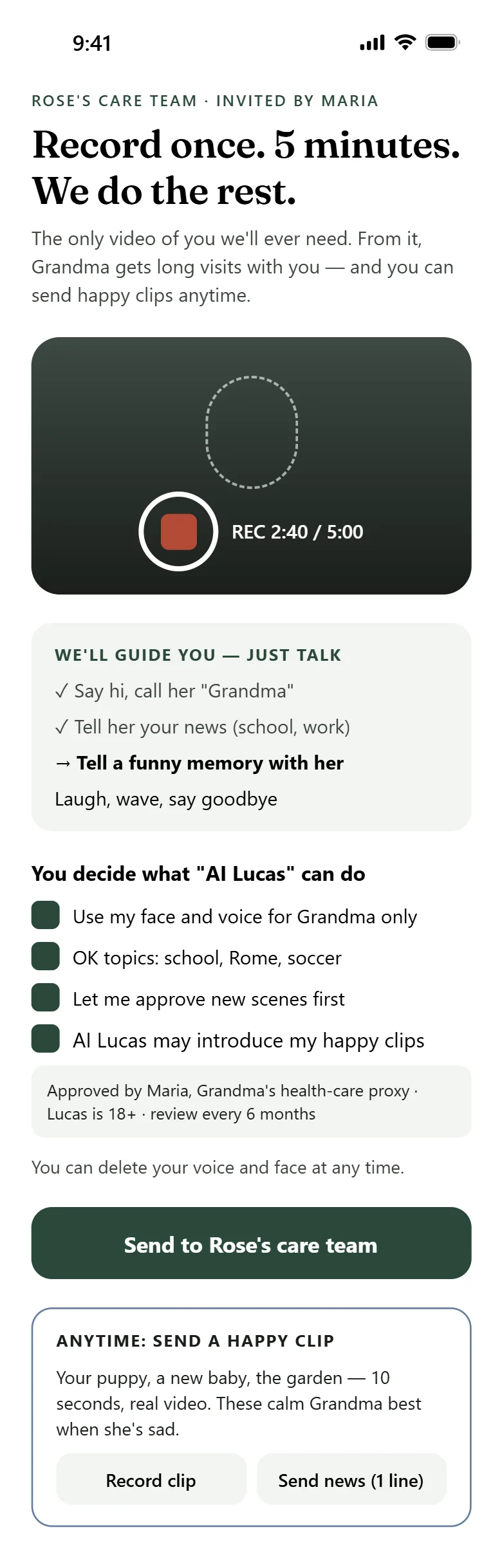
Record once. Five minutes.

A grandchild, daughter or son records five minutes, once — guided, just talking. They decide what their AI version may do, and can pause or delete it anytime.

  • One five-minute recording to start
  • Happy clips anytime: a new puppy, a baby, the garden
  • "She smiled today" — an update after each visit
A young man's hand holds a phone showing 'Record once. 5 minutes. We do the rest.' with his face on camera, recording at 2:40 of 5:00, and consent checkboxes.
Concept screen · fictional people · example numbers

The most important screen

Calibrate the persona of the AI visitor

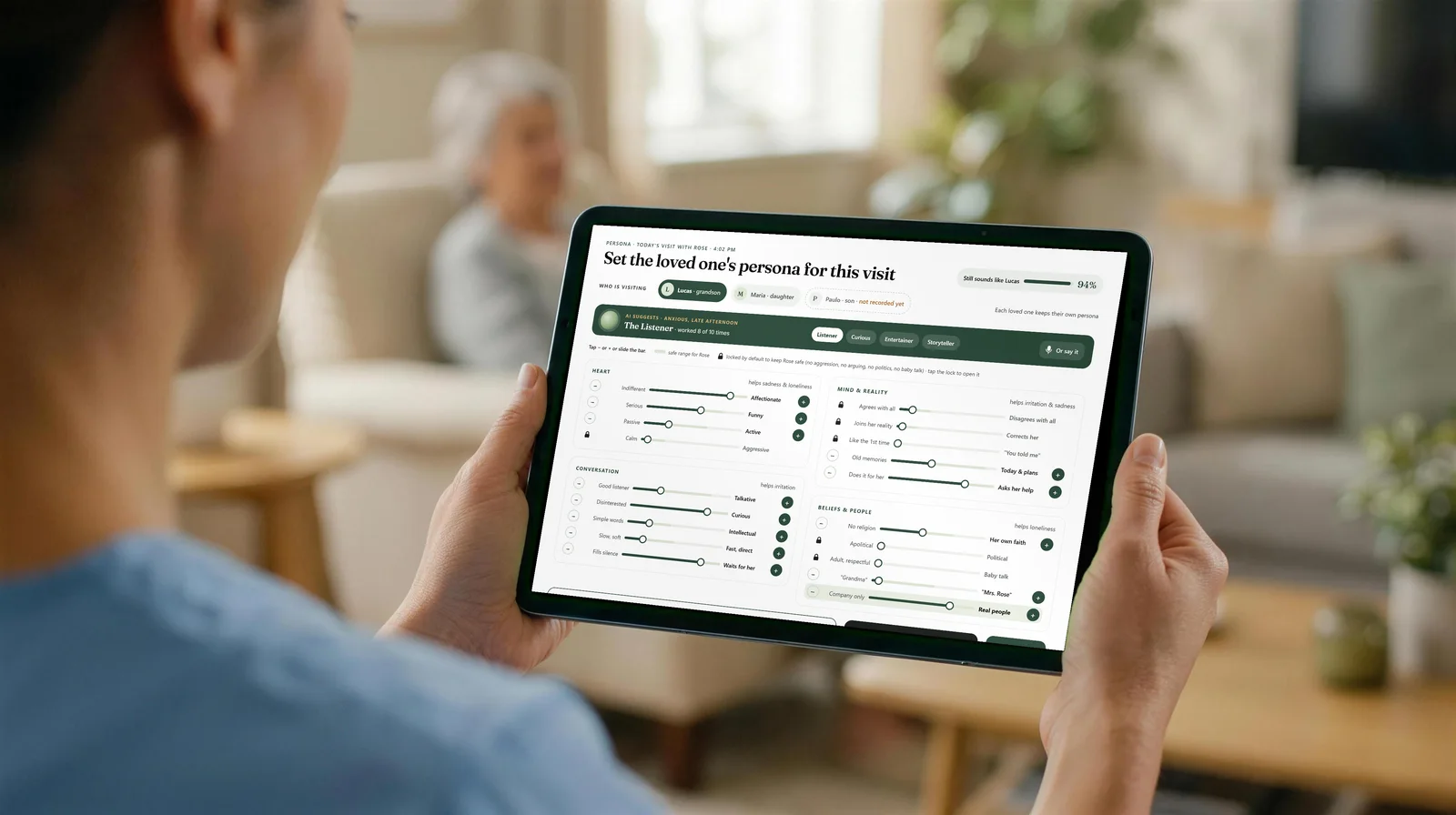
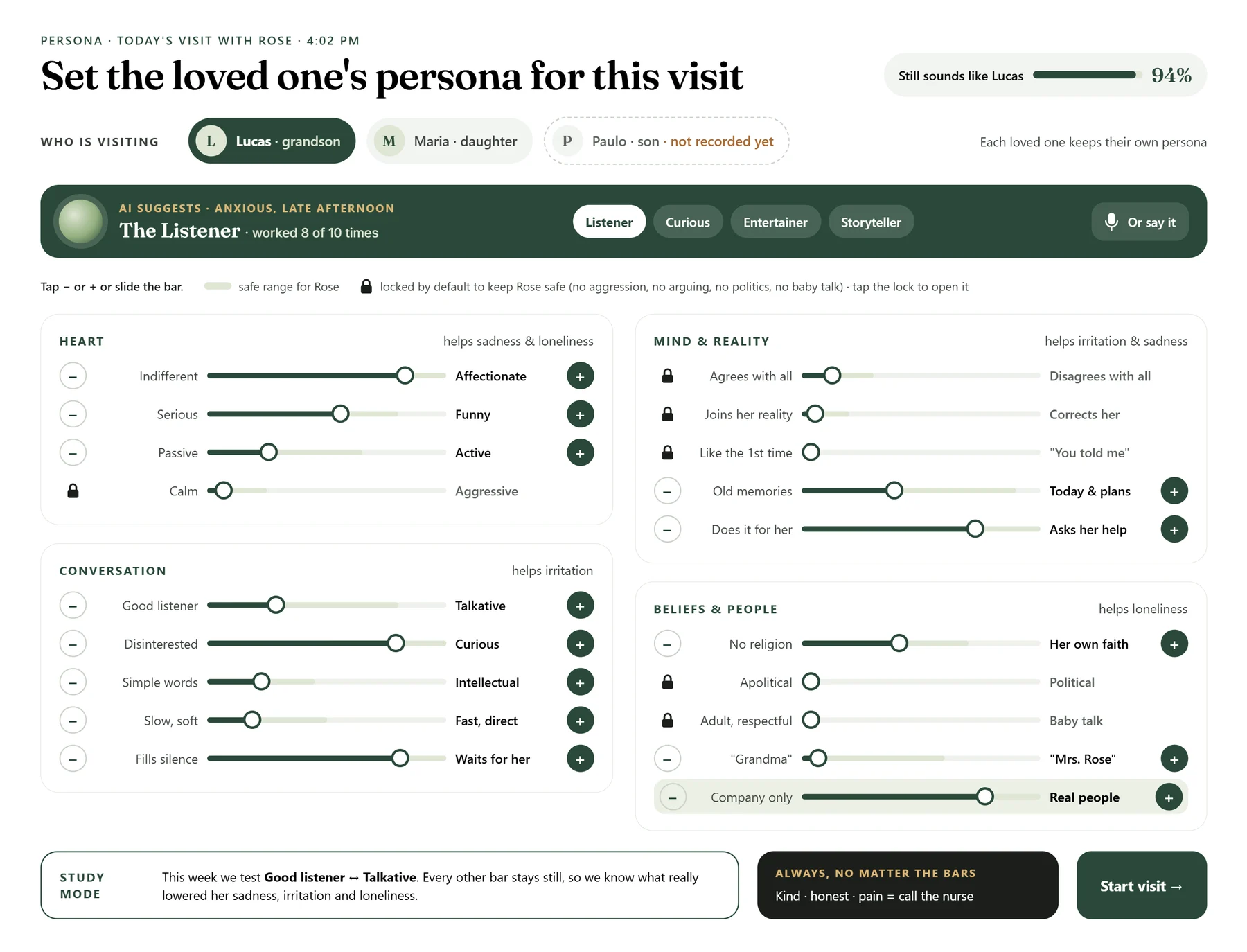
Before each visit, the caregiver sets how the AI version of the loved one will behave today: seven controls, in the order the caregiver uses them.

Persona calibration screen for today's visit with Rose: who is visiting (Lucas, Maria, Paulo); AI suggestion The Listener; four cards of bars — Heart, Conversation, Mind and reality, Beliefs and people — with minus and plus buttons, a safe range and padlocks; a meter that says Still sounds like Lucas; Study mode; Always: kind, honest, pain means call the nurse; Start visit. Numbers on the screen are examples, not results.
Concept screen · fictional people · click to enlarge
  1. 1
    Choose who is visitingLucas · grandson, Maria · daughter or Paulo · son. Paulo shows "not recorded yet": he has not recorded his video. Each loved one keeps their own persona.
  2. 2
    Start from the AI suggestionFor how she is right now — "anxious, late afternoon" — the concept screen suggests a starting style: "The Listener". The caregiver can choose another style — Listener, Curious, Entertainer or Storyteller — or tap "Or say it" and speak. The label on the screen is an example, not a result.
  3. 3
    Fine-tune with the barsEach bar goes between two opposites. Tap − or +, or slide the bar. The light green band is the safe range for Rose; each card names that group of bars.
  4. 4
    PadlocksBars with a padlock start locked to keep Rose safe: no aggression, no arguing, no politics, no baby talk. The caregiver can tap the lock to open it when there is a reason.
  5. 5
    "Still sounds like Lucas"The meter at the top of the concept screen shows how close today's settings stay to the real Lucas. The number on the screen is an example, not a result.
  6. 6
    Study mode"This week we test Good listener ↔ Talkative." Every other bar stays still, so the study looks at one setting at a time.
  7. 7
    Always, then startNo matter the bars: kind · honest · pain = call the nurse. Then the caregiver taps "Start visit".

The four groups of sliders on the screen

Heartwarmth and tone

  • IndifferentAffectionate
  • SeriousFunny
  • PassiveActive
  • CalmAggressivelocked by default

Conversationpace and talk

  • Good listenerTalkative
  • DisinterestedCurious
  • Simple wordsIntellectual
  • Slow, softFast, direct
  • Fills silenceWaits for her

Mind & realityher story, not a correction

  • Agrees with allDisagrees with alllocked by default
  • Joins her realityCorrects herlocked by default
  • Like the 1st time"You told me"locked by default
  • Old memoriesToday & plans
  • Does it for herAsks her help

Beliefs & peopletopics and people

  • No religionHer own faith
  • ApoliticalPoliticallocked by default
  • Adult, respectfulBaby talklocked by default
  • "Grandma""Mrs. Rose"
  • Company onlyReal people

Every screen, explained

The family's phone, the caregiver's tablet, Rose's TV and the care team's desktop

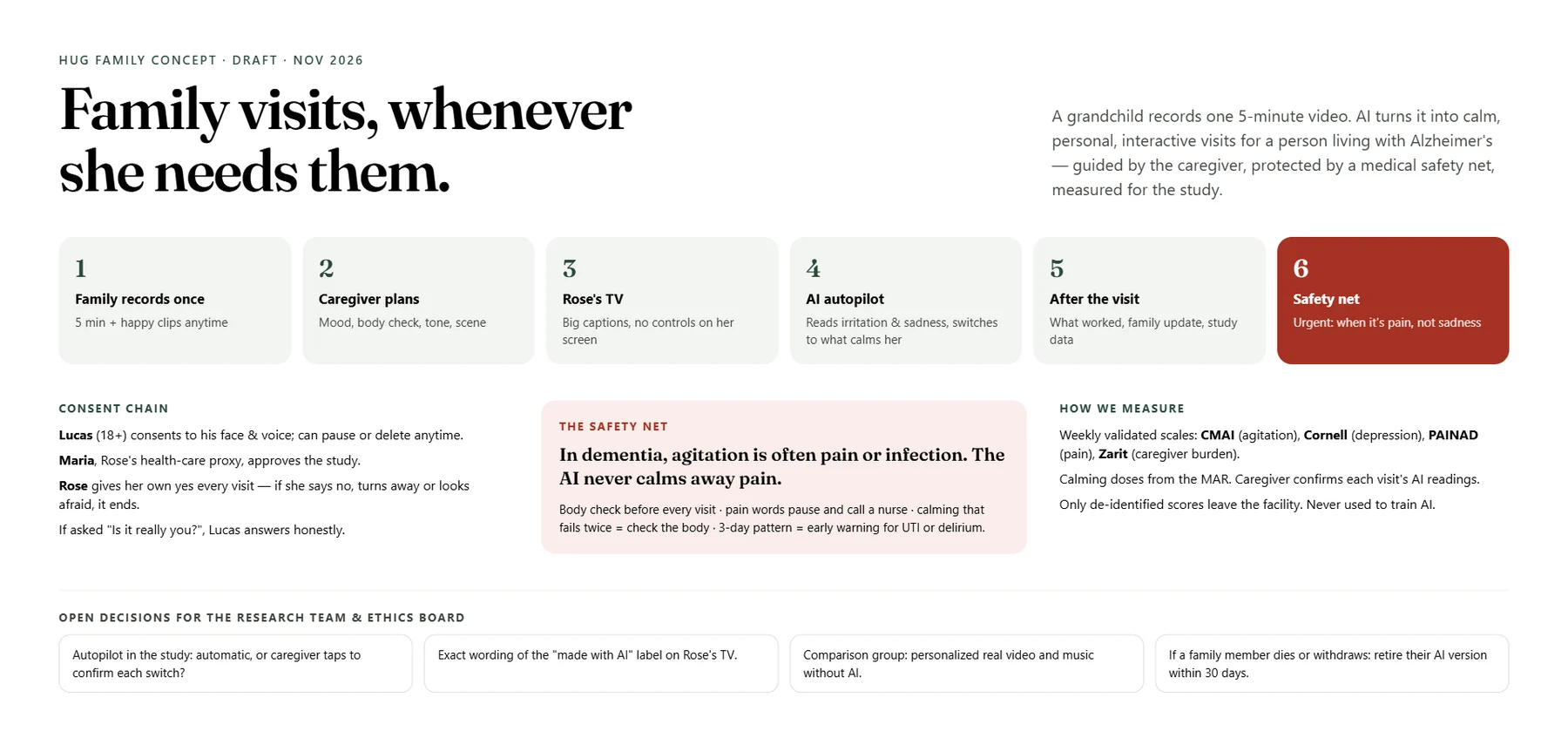
The six steps, the consent chain and the safety net — One board with the whole system: the six steps of a visit, who must say yes and when, how the safety net works, and the decisions still open for the research team and the ethics board.
00 · Overview

The six steps, the consent chain and the safety net

One board with the whole system: the six steps of a visit, who must say yes and when, how the safety net works, and the decisions still open for the research team and the ethics board.
  • Six steps from one recording to the room TV
  • Consent: Lucas, Maria as health-care proxy, and Rose herself at every visit
  • Decisions still open for the research team
Record once — five minutes — Opened from the link the family receives. It guides the recording — say hi, tell your news, tell a funny memory, say goodbye — and asks what "AI Lucas" may do.
01 · Record once — five minutes
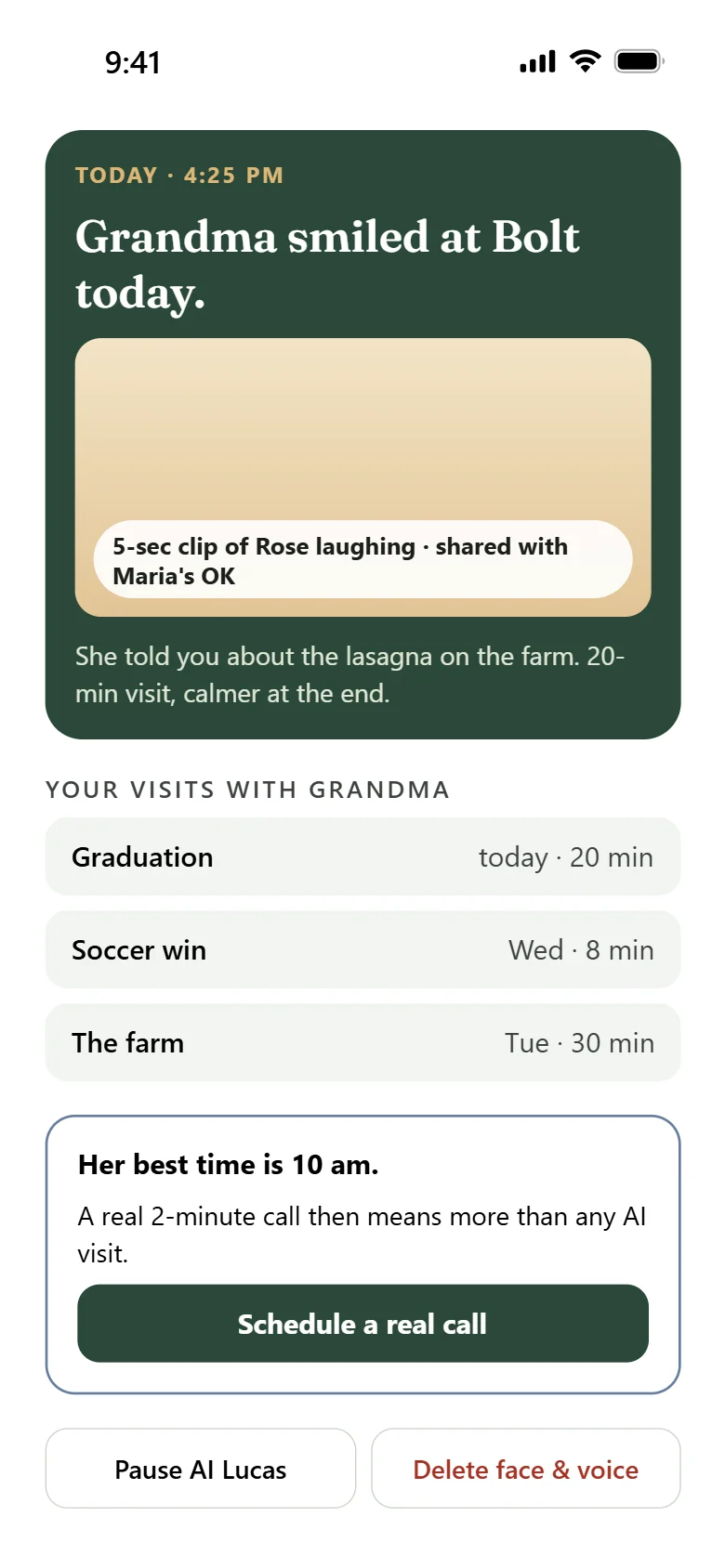
What the family receives — After each visit, a short update, the list of visits, and a button to schedule a real call.
01b · What the family receives

01 · Family · phone

Record once — five minutes

Opened from the link the family receives. It guides the recording — say hi, tell your news, tell a funny memory, say goodbye — and asks what "AI Lucas" may do.

  • Recording with live guidance: REC 2:40 / 5:00
  • Consent: face and voice for Grandma only, approved topics
  • Approved by Maria, Grandma's health-care proxy

01b · Family · phone

What the family receives

After each visit, a short update, the list of visits, and a button to schedule a real call.

  • "Grandma smiled at Bolt today"
  • Their visits, one after another
  • A real call at her best time of day
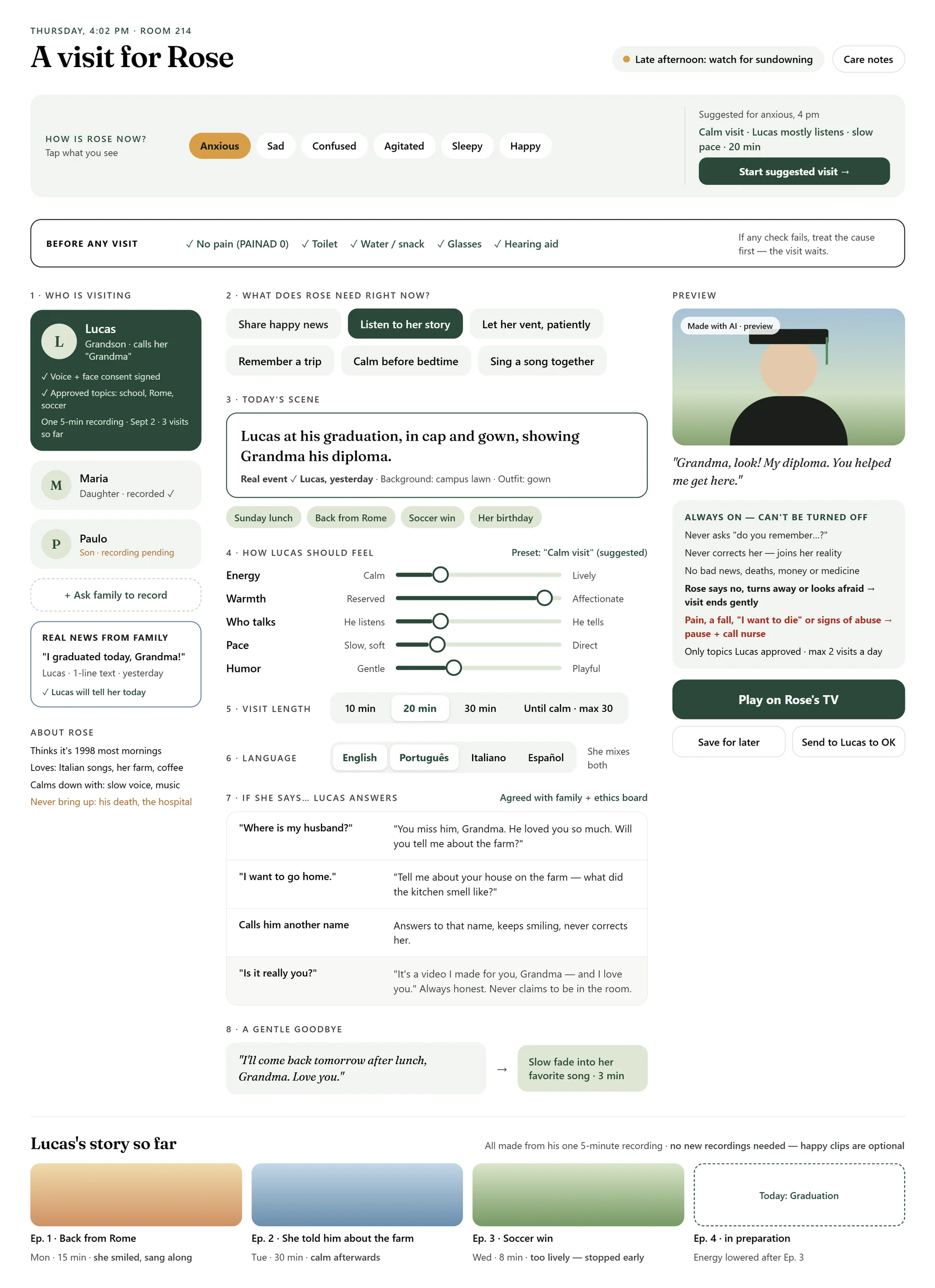
Plan the visit — The caregiver taps how Rose is right now (anxious, sad, confused, agitated, sleepy, happy). The app checks the body first — pain, bathroom, water or snack, glasses, hearing aid — then sets who visits, today's scene, the language, the answers for hard moments and a gentle goodbye.

02 · Caregiver · tablet

Plan the visit

The caregiver taps how Rose is right now (anxious, sad, confused, agitated, sleepy, happy). The app checks the body first — pain, bathroom, water or snack, glasses, hearing aid — then sets who visits, today's scene, the language, the answers for hard moments and a gentle goodbye.

  • Before any visit: the body check
  • Today's scene with a preview
  • Answers ready for "Where is my husband?"
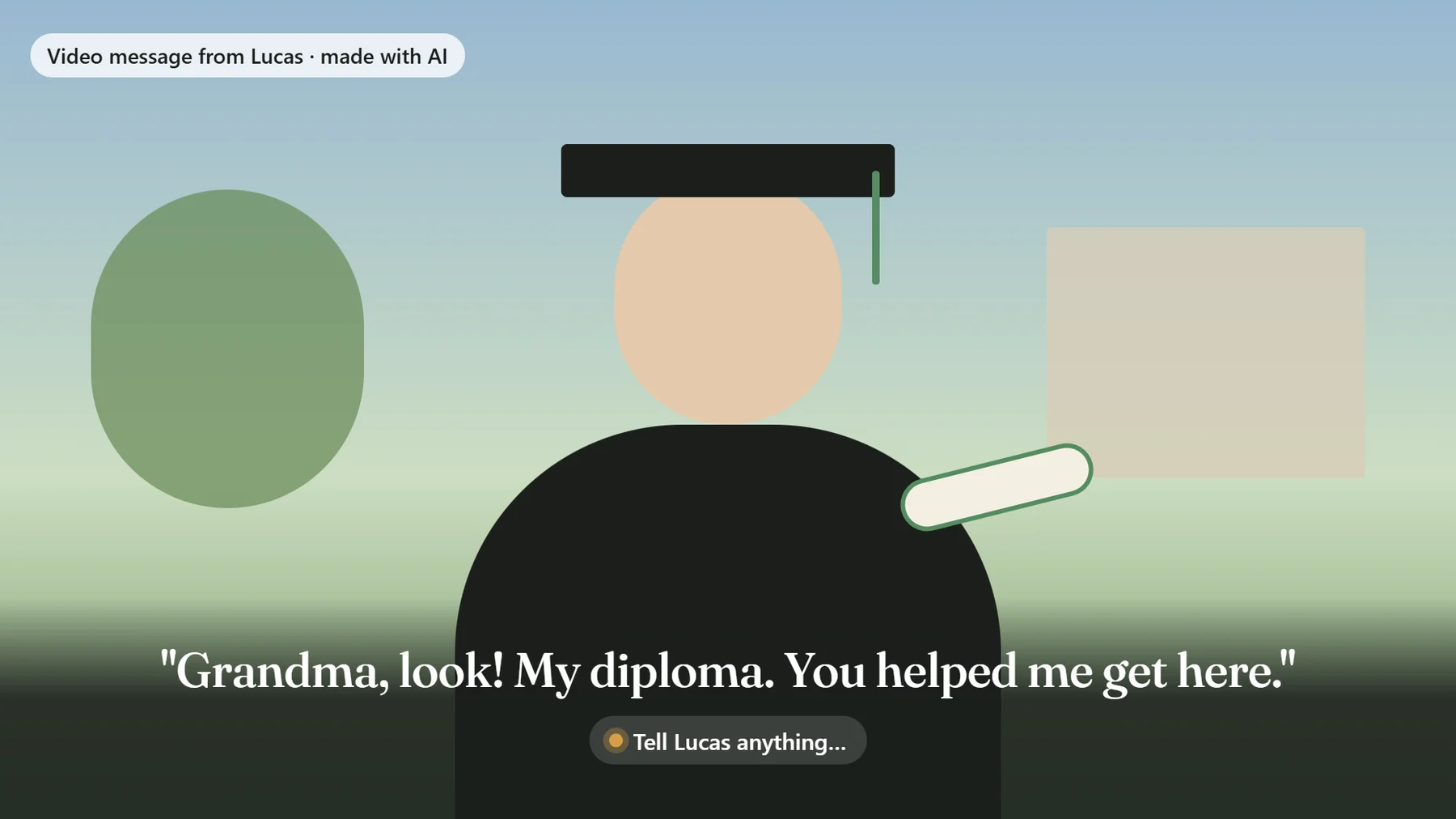
Rose's TV — What Rose sees: her grandson, one big caption, and the label "Video message from Lucas · made with AI". There are no buttons or menus on her screen.

03 · Loved one · TV

Rose's TV

What Rose sees: her grandson, one big caption, and the label "Video message from Lucas · made with AI". There are no buttons or menus on her screen.

  • Big captions
  • Always labeled as made with AI
  • Nothing for her to press
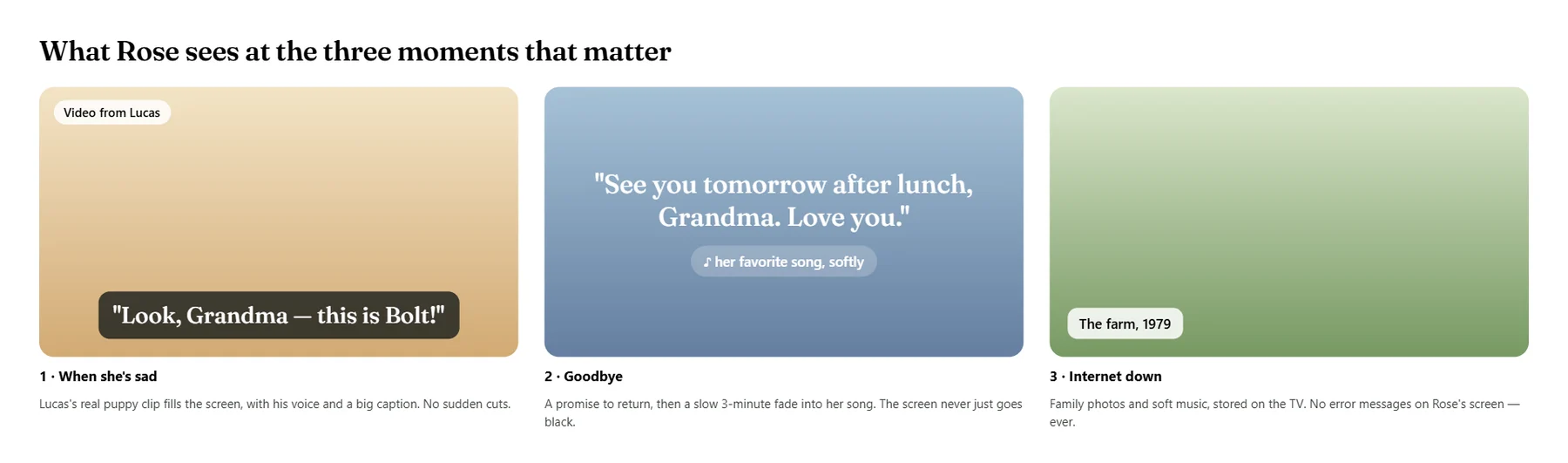
Three moments on the TV — When she is sad: a real family clip. At the end: a goodbye with a promise to come back, then her favorite song. If the internet fails: family photos, never an error message.

03b · Loved one · TV

Three moments on the TV

When she is sad: a real family clip. At the end: a goodbye with a promise to come back, then her favorite song. If the internet fails: family photos, never an error message.

  • A family clip
  • A gentle goodbye, then music
  • Offline: family photos
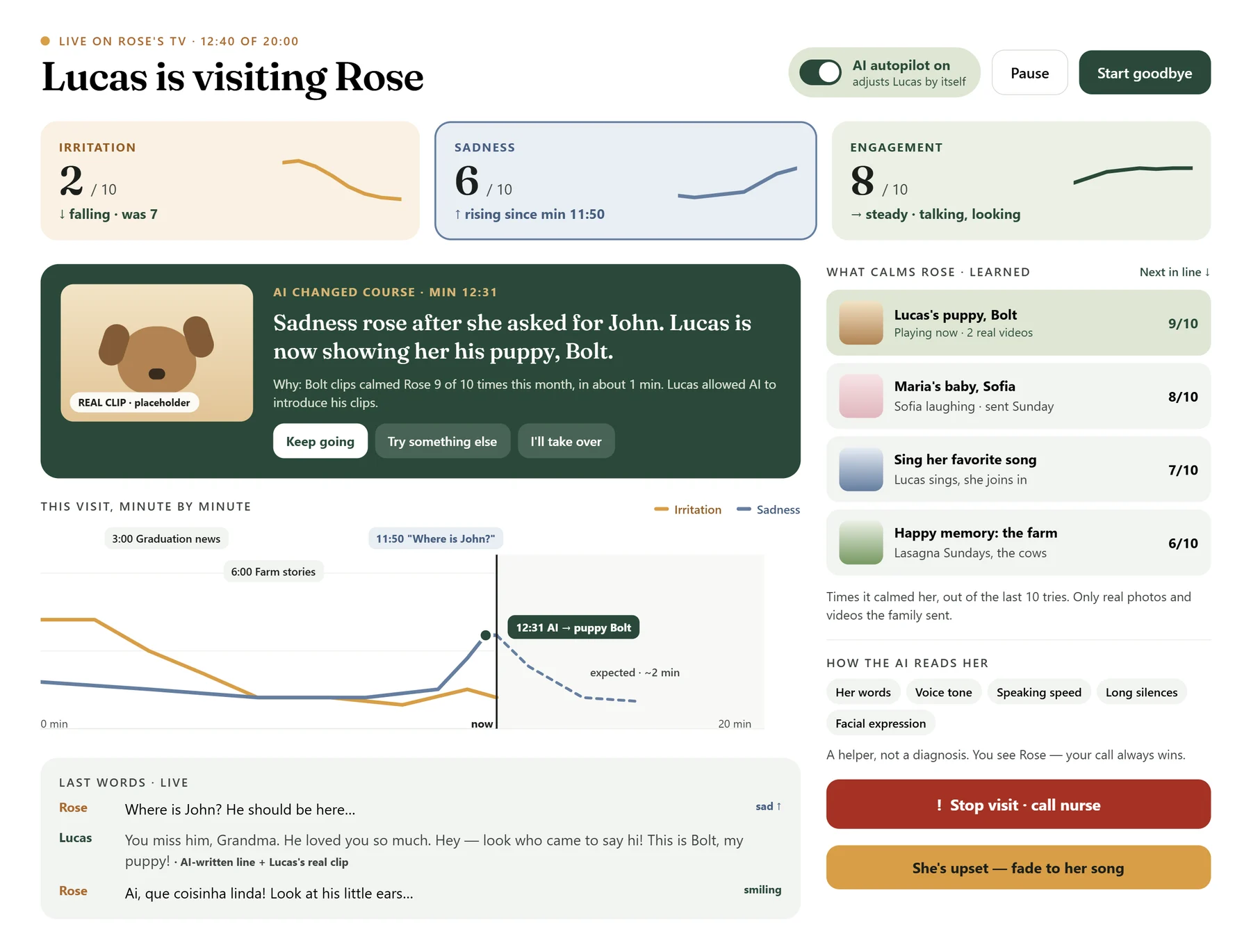
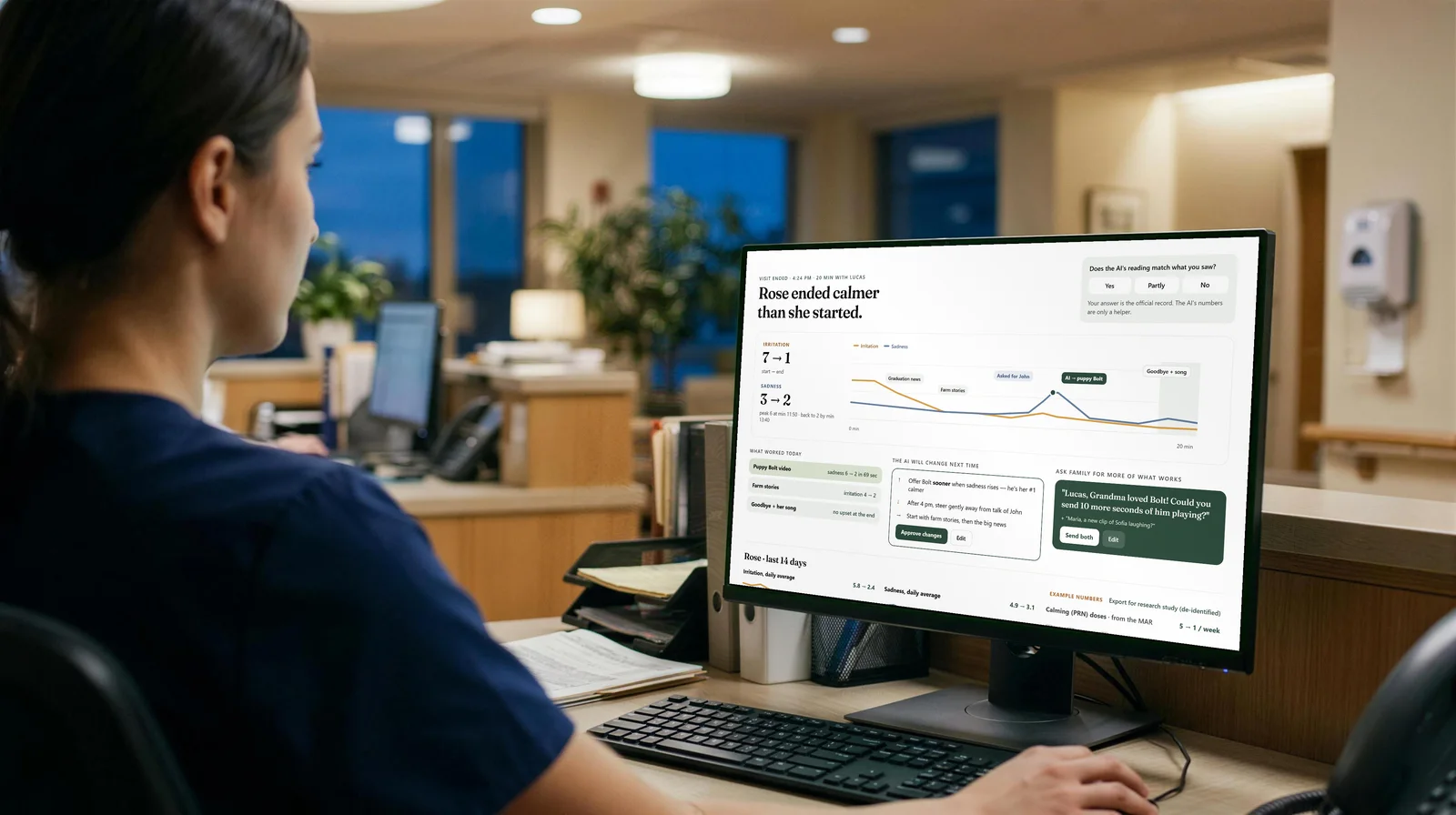
During the visit: AI autopilot — Three live readings — irritation, sadness, engagement — from her words, voice, pace, silences and face. When sadness rose after she asked for John, the AI switched to Lucas's real clip of his puppy. The caregiver can keep going, try something else, or take over.

04 · Caregiver · tablet

During the visit: AI autopilot

Three live readings — irritation, sadness, engagement — from her words, voice, pace, silences and face. When sadness rose after she asked for John, the AI switched to Lucas's real clip of his puppy. The caregiver can keep going, try something else, or take over.

  • Family clips the caregiver can choose
  • Her last words, live
  • "Stop visit · call nurse" always on screen
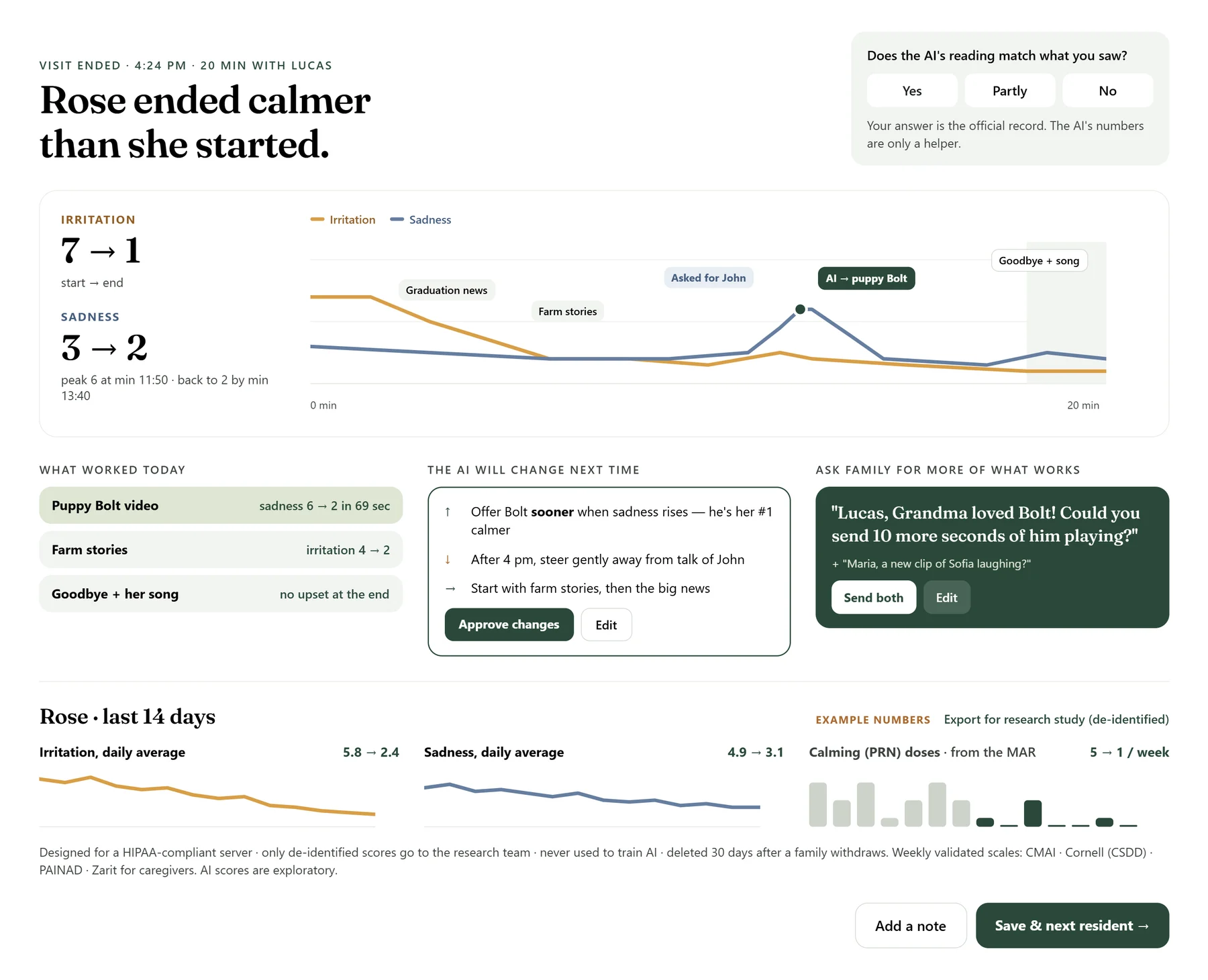
After the visit — The concept screen shows example numbers for the visit, what the caregiver confirmed, and a request to the family. The numbers are examples, not results.

05 · Care team · desktop

After the visit

The concept screen shows example numbers for the visit, what the caregiver confirmed, and a request to the family. The numbers are examples, not results.

  • Example numbers, not results
  • What would change next time, with staff approval
  • A note back to the family
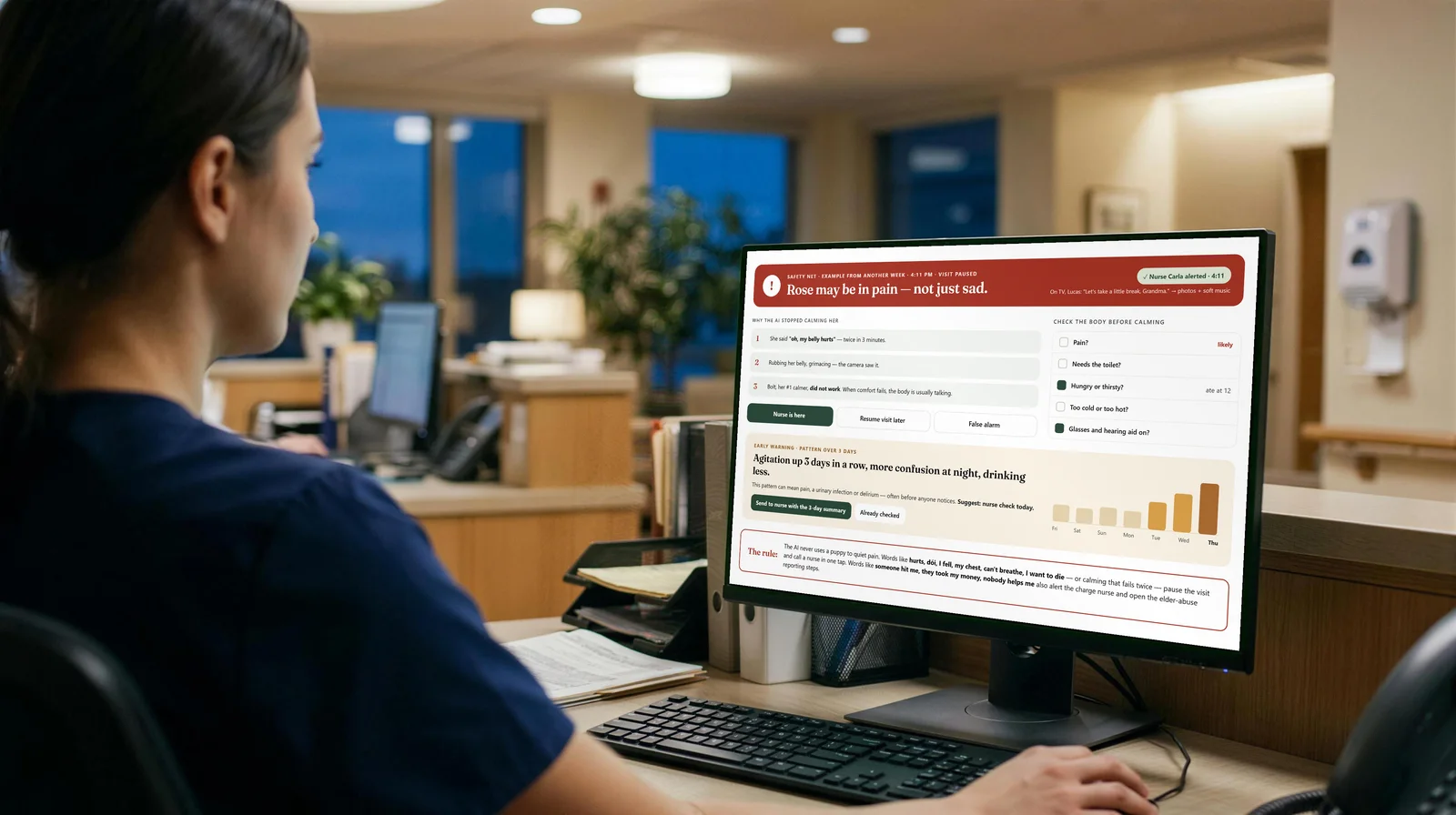
Safety net — Safety first: if the resident mentions pain, a fall, wanting to die, or stays distressed, the session pauses and alerts the nurse. HugVisit never diagnoses; staff always assess.

06 · Nurse · desktop

Safety net

Safety first: if the resident mentions pain, a fall, wanting to die, or stays distressed, the session pauses and alerts the nurse. HugVisit never diagnoses; staff always assess.

  • The session pauses
  • The nurse is alerted
  • Staff always assess
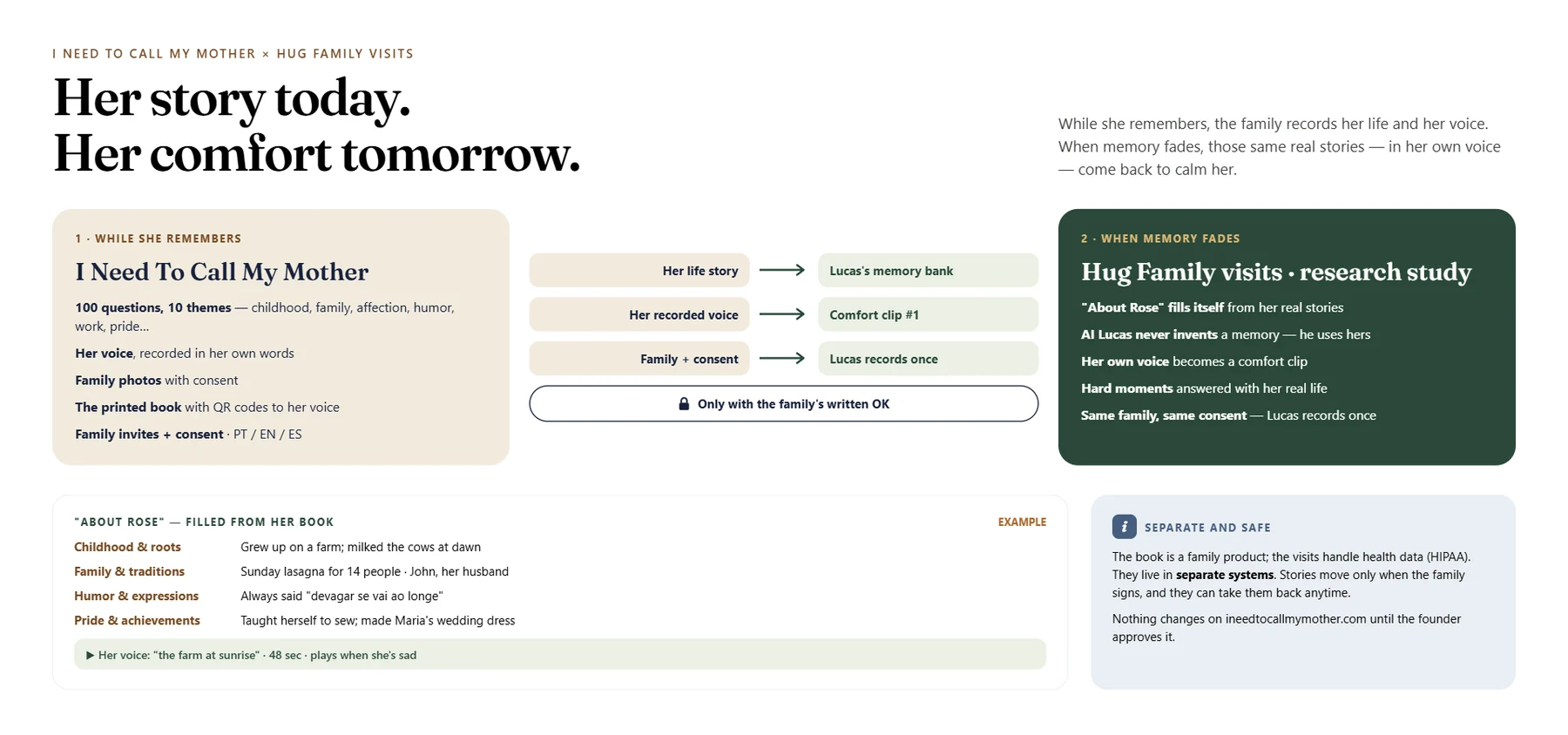
Book 1 becomes the memory of every visit — The life story recorded with I Need To Call My Mother becomes the AI's memory bank, with the family's signature. Her own recorded voice becomes her first comfort.

09 · I Need To Call My Mother

Book 1 becomes the memory of every visit

The life story recorded with I Need To Call My Mother becomes the AI's memory bank, with the family's signature. Her own recorded voice becomes her first comfort.

  • Real memories, never invented
  • Her own voice as comfort
  • Stories move only with consent
Two hardcover family books on a wooden table: a navy Book 1 and a green Book 2, The Continuation, open to a farm photo.AI-generated image · fictional people

New · The Continuation Book

Their stories don't stop. Neither does their book.

The first book, recorded with I Need To Call My Mother, holds the life they told while they remembered. With HugVisit, the family can keep going: the stories they still tell become a second book — The Continuation — to stay with the family forever.

Book 1I Need To Call My MotherRecorded while they remembered: childhood, family, love, work, pride — in their own voice. It also becomes the first memories of HugVisit and sets the persona of each loved one.
Book 2The ContinuationThe stories they tell now: during visits, to the people who care for them, and the ones they repeat — because the stories we repeat are the ones that matter most.

Every protagonist of their life

The first book from I Need To Call My Mother already knows the main people in their story. That knowledge sets the persona of each loved one — the way they talk, the nicknames, the memories they share.

  • Mother or fatherthe person telling the story
  • Son or daughtertheir children
  • Grandson or granddaughterthe next generation
  • Brother or sisterthe ones who grew up with them
Where the stories come from

During HugVisit visits

With their own yes and the family's consent, the visit keeps the stories they tell — the farm, the wedding, the lasagna. The family can stop saving stories or delete any of them at any time.

To the people who care for them

Stories told to nurses and caregivers at the hospital or nursing home can be added only with the person's own yes, the family's written consent, the staff member's agreement and the facility's permission. Never medical details, and nothing about other residents or staff. Nothing is ever recorded without notice.

The ones they repeat

A story told many times is treasured, not corrected. The book keeps it once, as they told it, and the family decides what to include.

  • The family approves every page before printing
  • Nothing private, medical or hurtful is printed
  • Their voice stays: QR codes play the real recordings
  • Ordered and printed through I Need To Call My Mother

The safety net · Ethics and consent

Safe by design. Honest by default.

HugVisit never pretends to be a family member, never diagnoses, and never decides alone.

When it's pain, not sadness

Safety first: if the resident mentions pain, a fall, wanting to die, or stays distressed, the session pauses and alerts the nurse. HugVisit never diagnoses; staff always assess.

It does not replace nurses, doctors or 911.

  • The session pauses
  • The nurse is alerted
  • Staff always assess

Concept only. It does not replace nurses, doctors or 911.

Everyone says yes — including them

Designed with privacy in mind. By design, their stories are not used to train AI models.

Built on I Need To Call My Mother — the life story recorded there becomes the memory of every visit.

Visit I Need To Call My Mother

Research

A research concept

Concept being prepared for a research proposal to the University of South Florida (USF) — pending.

Frequently asked

Is HugVisit available now?

Not yet. It is a concept being prepared for a research pilot.

Is the person on the screen really my family member?

No. It is a video made with AI from one recording that the family member chose to share. If someone asks, the answer is always honest.

Who decides what the AI version says?

The family member sets what is allowed. The caregiver chooses the visit. Hard topics are agreed in advance.

What if the person mentions pain?

Safety first: if the resident mentions pain, a fall, wanting to die, or stays distressed, the session pauses and alerts the nurse. HugVisit never diagnoses; staff always assess. It does not replace nurses, doctors or 911.

What is the Continuation Book?

A second book with the stories they still tell, approved by the family page by page and printed through I Need To Call My Mother.

Do I need the first book?

No, but it helps: it gives the visits real memories and sets each loved one's persona.

Is it for mothers only?

No. It is for mothers, fathers, grandparents — anyone living with Alzheimer's — and for every loved one who visits.

What happens to the recordings?

The family can pause or delete them anytime. By design, they are not used to train AI models.

Interest list

Be the first to know

Tell us who you are. We will only write about this concept and the pilot.

Please do not share any health information here. Read the privacy notice